• Welcome to the ElgrandOC forum.

    You will find that the majority of the forum is locked, but do not worry. You can unlock more content by registering to the forum completely free. Sign up is automatic, does not require email confirmation and is instant. Feel free to browse through the sections to see what topics have been covered before you register.
    You can register for an account by CLICKING HERE

    Once you have registered, you will unlock more of the forum content. You will not unlock all of the content until you have reached 10 posts. This is to give you an opportunity to chat to existing members and help to integrate you into the forum community.
    We are a friendly and helpful community and there is a wealth of infomation contained within the forum. Please feel free to register, introduce yourself and get to know your fellow members.

    Feel free to look at the Frequently Asked Questions section, the Meets/Events section and the Competition Section without having to register.
    We look forward to getting to know you and help you with any questions or problemd you have with your Elgrand.

What do you have on your TV AUX

That looks same as TV tuner in my S3 with drop down screen but I have another tuner somewhere
Looking at the instruction manual it appears to be a digital TV tuner. Still no use in the UK, but if I can work out which button on the remote switches this digital receiver to its own "Aux" mode then I should be able to get a feed in from the aux-in sockets on the unit.
 
Looking at the instruction manual it appears to be a digital TV tuner. Still no use in the UK, but if I can work out which button on the remote switches this digital receiver to its own "Aux" mode then I should be able to get a feed in from the aux-in sockets on the unit.
Let me know which button 😂
 
Let me know which button 😂
Actually just realised that's pointless and may as well just remove the unit as it doesn't do anything and connect the Fire Stick (or whatever) direct to the RCA inputs that it's currently plugged into. That way I don't have to translate the remote!
 
Was going to suggest it as that was what I did. Seems pointless to power something from the battery for it to pass the signal through it.
 
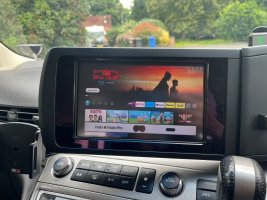
So... that was easier than I expected! I plugged an Amazon Fire TV Stick into an HDMI -> RCA adaptor and then plugged that into the Aux sockets in place of the Digital TV tuner. Fired it up and worked straight away on the Aux channel! It will work for phone mirroring as well although the iPhone can't mirror direct to the Fire so needs a third party app - managed to get Google Maps up and running although the display quality isn't great. The power feed to the Digital Tuner appears to be switched so it is only live when the Aux is selected so I think the next step will be to hardwire the power to the Amazon Fire and the HDMI --> RCA from that rather than running them from the cigarette lighter in the boot. Will also remove the old DTV tuner to create some space as it's not needed. I haven't tested, but assuming the screen only works when the parking brake is on as I can't see any override has been fitted for that.

Not sure I will use the phone screen mirroring much, but at least gives the ability to play movies / TV via the Aux channel

AV Screen.jpg
 
So... that was easier than I expected! I plugged an Amazon Fire TV Stick into an HDMI -> RCA adaptor and then plugged that into the Aux sockets in place of the Digital TV tuner. Fired it up and worked straight away on the Aux channel! It will work for phone mirroring as well although the iPhone can't mirror direct to the Fire so needs a third party app - managed to get Google Maps up and running although the display quality isn't great. The power feed to the Digital Tuner appears to be switched so it is only live when the Aux is selected so I think the next step will be to hardwire the power to the Amazon Fire and the HDMI --> RCA from that rather than running them from the cigarette lighter in the boot. Will also remove the old DTV tuner to create some space as it's not needed. I haven't tested, but assuming the screen only works when the parking brake is on as I can't see any override has been fitted for that.

Not sure I will use the phone screen mirroring much, but at least gives the ability to play movies / TV via the Aux channel

View attachment 105286
I’m just about to try the same thing with my series 3 2008, just waiting on the adapter cable from Japan!
 
I’m just about to try the same thing with my series 3 2008, just waiting on the adapter cable from Japan!

Fortunately the previous owner seems to have done me a favour as having removed the DTV tuner there are RCA sockets and power running into the boot storage compartment which makes the process much easier!
 
Pretty sure @LeStempy told me that you need the tuners in place to distribute video to both screens (if you have two). I left mine in and can have AUX on either screen or both as required.
 
Fortunately the previous owner seems to have done me a favour as having removed the DTV tuner there are RCA sockets and power running into the boot storage compartment which makes the process much easier!
Yeah that would be a bit easier, my tuner is behind the drivers side far rear panel, but because I only have one screen, there is no aux sockets, so I need the adaptor for the tuner, and the aux to hdmi adaptor , and a usb splitter, to power the firestick and the hdmi adaptor! 😫😆
 
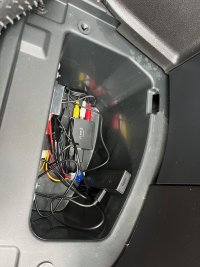
So.... little bit of tinkering yesterday and now have an operational Fire Stick on the Aux. The DTV tuner had red and yellow power wires (I'm guessing one meant to be permanent live and one ignition switched?) but following them back they both lead to a single red +ve wire anyway so I just twinned them together and attached these and the earth to a DC12v -> DC5V convertor with two USB socket outputs. These power the Fire Stick and the HDMI to RCA adaptor and the whole thing sits in the little storage well in the right hand side of the boot with no need to run wiring up to the cigarette lighter cable.

With the aid of mobile hotspot I can also get BBC Sounds app via the Fire Stick to get Six Music on the radio which is a nice bonus! The Aux screen appears to work regardless of whether the car is moving or not.

The screen mirroring from the iPhone does work as well using the AirScreen app, but the resolution isn't brilliant so not sure how much I will use it.

Nice easy first project though...


IMG_1199.jpeg
 
So... that was easier than I expected! I plugged an Amazon Fire TV Stick into an HDMI -> RCA adaptor and then plugged that into the Aux sockets in place of the Digital TV tuner. Fired it up and worked straight away on the Aux channel! It will work for phone mirroring as well although the iPhone can't mirror direct to the Fire so needs a third party app - managed to get Google Maps up and running although the display quality isn't great. The power feed to the Digital Tuner appears to be switched so it is only live when the Aux is selected so I think the next step will be to hardwire the power to the Amazon Fire and the HDMI --> RCA from that rather than running them from the cigarette lighter in the boot. Will also remove the old DTV tuner to create some space as it's not needed. I haven't tested, but assuming the screen only works when the parking brake is on as I can't see any override has been fitted for that.

Not sure I will use the phone screen mirroring much, but at least gives the ability to play movies / TV via the Aux channel

View attachment 105286
no watching boxsets whilst driving young man
:)
 
So.... little bit of tinkering yesterday and now have an operational Fire Stick on the Aux. The DTV tuner had red and yellow power wires (I'm guessing one meant to be permanent live and one ignition switched?) but following them back they both lead to a single red +ve wire anyway so I just twinned them together and attached these and the earth to a DC12v -> DC5V convertor with two USB socket outputs. These power the Fire Stick and the HDMI to RCA adaptor and the whole thing sits in the little storage well in the right hand side of the boot with no need to run wiring up to the cigarette lighter cable.

With the aid of mobile hotspot I can also get BBC Sounds app via the Fire Stick to get Six Music on the radio which is a nice bonus! The Aux screen appears to work regardless of whether the car is moving or not.

The screen mirroring from the iPhone does work as well using the AirScreen app, but the resolution isn't brilliant so not sure how much I will use it.

Nice easy first project though...


View attachment 105405

Good work! I’m still waiting for my adaptor from Japan! 🙄
 
Google chromecast for me, basically turns it into a smart TV with a remote. Considering one of the cheap gaming emulating hdmi sticks as another upgrade in the future..
I’ve got chromecast plugged in to the middle console, then I have a HDMI cable from the chromecast to an adapter as an input then the output is RCA to the RCA port on the bottom.

When I push AUX button it comes with rainbow screen and says no signal.

It doesn’t say it when it’s not plugged in which means I’m on the right track.

Did this happen to you before you got it right??
 
The colour bars show that the adapter is working so try another HDMI source.
 
So after playing with the Fire Stick for a couple of weeks I think I have found a better use for the Aux port as I won't realistically be watching videos much as we only have a front screen.

I had some issues with the OEM Bluetooth audio "stuttering" when streaming music from my phone which is annoying and at least with the iPhone you don't appear to be able to connect it both as a phone and play Bluetooth audio without upsetting the system and the whole thing disconnecting.

I have found a partial workaround to this by connecting one of these TPLink Bluetooth audio receivers to the audio connectors of the Aux RCA and using that to stream music which cuts out the stuttering. I also found that if you just connect the iPhone to the Series 3 as a phone (and not as an audio streaming device) that it does work without cutting out, which is useful as the mic and speakers are much better for calls.

With this setup I can connect to the built in handsfree for the phone and stream music to the TPLink audio at the same time without the issue of the phone disconnecting. Originally I thought you had to disconnect from MyCar to stream to the TPLink, but I found that you just have to select which device you want Spotify to stream to in the Spotify app and choose the TPLink.

Incoming and outgoing phone calls work as they should be muting the Aux and switching to the phone on the built in hands free.

The screen is obviously blank on Aux as there is no video, but you can use the display button to bring up the Fuel / Aircon status screens whilst staying on Aux playing audio which then gives you the outside temp / fuel economy etc. on screen.

Works well for me so I thought I would share as it's nice to be able to have the built in handsfree and non-stuttering music streaming. The only downside I can see is that you can't use the steering wheel buttons to skip tracks on the bluetooth audio.

This may be iPhone specific as I don't have an Android phone to test it with.
 
Last edited:
So my first mod was to disable the TV aux turning off when moving/handbrake released.

Hi guys, do you mind sharing how to disable the TV aux turning off whilst driving? Thank you so much
 
You can buy a bypass cable and switch. I think @LeStempy will sell you one from his eBay shop.
 
Hi guys, do you mind sharing how to disable the TV aux turning off whilst driving? Thank you so much
Which series Elgrand?
 
Back
Top