• Welcome to the ElgrandOC forum.

    You will find that the majority of the forum is locked, but do not worry. You can unlock more content by registering to the forum completely free. Sign up is automatic, does not require email confirmation and is instant. Feel free to browse through the sections to see what topics have been covered before you register.
    You can register for an account by CLICKING HERE

    Once you have registered, you will unlock more of the forum content. You will not unlock all of the content until you have reached 10 posts. This is to give you an opportunity to chat to existing members and help to integrate you into the forum community.
    We are a friendly and helpful community and there is a wealth of infomation contained within the forum. Please feel free to register, introduce yourself and get to know your fellow members.

    Feel free to look at the Frequently Asked Questions section, the Meets/Events section and the Competition Section without having to register.
    We look forward to getting to know you and help you with any questions or problemd you have with your Elgrand.

Where is the DVD/NAV system in the workshop manual?

Permanent 12v possibly for memory retention as on a HU. ACC for switched 12v, +B for permanent 12v. You can ground to chassis or the black cable.
 
  • Like
Reactions: Bal
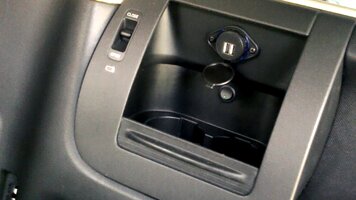
Thanks for all your help. I've installed a 12v socket, voltmeter and two usb chargers into the single din enclosure where the dvd/satnav was, and another 12v socket and usb/aux input for my soon-to-be head unit above the popout drinks holder on the passenger side. Theres enough space there to drill through. Both inline fused and powered by the 12v accessory feed that went to the electronic toll reader. Starting to feel quite 21st century!
 
Good work. If you get a chance pop up some pictures.
 
Pics as promised.

Switched 12 volt socket, dual usb charging socket and voltmeter in the glovebox running on the accessory circuit - and usb/aux inputs for the headunit and another 12v socket set into the side of the centre column

.glovebox voltmeter on and sockets.jpg

The headunit in a replacement double din fascia.

pioneer head off and sockets.jpg

And, for extra points, switched lighted dual usb chargers in each of the rear cupholders (not wired in yet)

cupholder usb.jpg

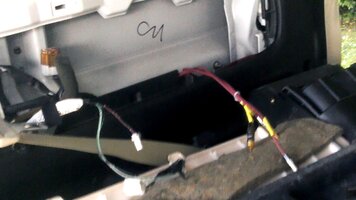
And rca's run through the passenger side door steps to the back for rear video screen and subwoofer hookup

rca cables back left.jpg
 
Last edited:
Nice. Good work.
 
Cheers,
still going, but pleased as punch as i've not done anything like this (electrics) before.
 
Just a tip if anyone does the same with usb in rear cupholders.....

i had to lower the switches (now mounted on the plastic partition between cup holder cavities) as there is a metal protrusion higher up on the van walls, and they wouldn't fit.

bad picture to illustrate....usb and switch.jpg
 
Just came across this and looks like its going on my list, no need for the toll reader or DVD player so will whip them out, USB ports would be handy for the Footwell lighting.
 
The DVD/Nav player is also the brains of the system, if you remove it you will lose control of all the various devices and other features such as the clock.

View attachment 93739
HELP..!!!!!!!!!! Hi, well it looks like.???? a complete diagram of the SATNAV/DVD system but it doesn't mean a damn thing because it's in Japanese.(of course) So here is my problem.... I want to remove the satnav/dvd module and replace with a DVD player. Now to do that I would need to know what cables are in the back of this MODULE/UNIT that I can use to connect a player too. Obviously I need to know what are the video/audio and power cables that I can use to connect my player to..so is there anyone out there with suggestions. (My cd player and radio work fine so no need to touch them..)
 
As mentioned, the DVD/NAV is also the control centre so removing it will render the rest of the system inoperative. Better to use the RCA aux input jacks to connect a separate DVD player.
 
I have just been looking into the original posts idea of connecting into the dvd composite signal as an input to the screen; I used a camera set to ntsc on composite out as a source and connected to pins 26 and 28 on the 40 pin connector and can get an image but it is in black white, so not sure why that is. possibly the signal also needs to sync with the rgb signals from the nav unit?
you also need to have a dvd in the unit in order for that signal to be turned on, i dont have any ntsc or multi region dvd's so im stuck with a warning on the screen as well. 🤦‍♂️
I tried unplugging the 40 pin from the nav unit and it did leave the image on screen initially and the warning dissapeared, but then if you do anything to change the image like putting into reverse or using side blind; there is no way to get the image back. I tried jumpering 14 and 16 which seems to be related to the nav button but it did nothing so I dont think it is a simple trigger and is a more complicated signal which is way above my head.
side note- with the nav unplugged; the reverse camera, side blind, and info screens all still work. to be honest ive been driving around for the last 3 years with the nav screen just showing the empty blue map with the pointer in the middle, i do use the reverse camera and sometimes the side blind though. so im thinking I might just change the screen to a touch screen with hdmi input and then change the camera's to something that is compatible with a modern head unit.
 
Yes the system is controlled via canbus so not easy to interface with. The reverse camera signal feeds directly to the screen and the driver information pages are generated within the screen also so should still work with the dvd/nav disconnected but you may lose A/V button functionality. If you have the drop down screen in the rear there will be an image distributor fitted so you can splice into that.

The Elgrand video system uses a separate positive going sync signal rather than the combined negative sync of convention.
 
Back
Top