• Welcome to the ElgrandOC forum.

    You will find that the majority of the forum is locked, but do not worry. You can unlock more content by registering to the forum completely free. Sign up is automatic, does not require email confirmation and is instant. Feel free to browse through the sections to see what topics have been covered before you register.
    You can register for an account by CLICKING HERE

    Once you have registered, you will unlock more of the forum content. You will not unlock all of the content until you have reached 10 posts. This is to give you an opportunity to chat to existing members and help to integrate you into the forum community.
    We are a friendly and helpful community and there is a wealth of infomation contained within the forum. Please feel free to register, introduce yourself and get to know your fellow members.

    Feel free to look at the Frequently Asked Questions section, the Meets/Events section and the Competition Section without having to register.
    We look forward to getting to know you and help you with any questions or problemd you have with your Elgrand.

What do you have on your TV AUX

Yes, select VTR on the rear screen. Spec says default video is NTSC so should be plug and play.
 
Not got to try it yet but the wife is trying a 6-in-1 adapter plugging into the radio hdmi in and getting sound only, any tips?
 
IIRC the HDMI input is not full HD so maybe try dropping the resolution of the source.
 
Does anyone get a message on screen when connecting phone through USB c to hdmi > hdmi to ntsc rca converter > aux in that DEx on phone doesn't support native low res screens on e51? I think I may need to artificially impose 480p Edid signal back to phone. Would an android box solve this and how?
 
I’ve been running an X96 Mini Android TV box in my Elgrand E51 for about three years now, using an HDMI converter. It’s been solid at 480p, and honestly, the picture quality is surprisingly good considering the screen is over twenty years old.

The only issue I’ve ever had is the occasional bit of signal noise caused by the vehicle’s electrical system. I managed to eliminate most of that with a ground loop isolator on both the audio and video lines. In fact, I recently cut the noise down almost completely by connecting the X96 Mini’s AV output directly to the van’s RCA ports, bypassing the converter altogether.

As for using Samsung DeX — I can’t really see the point. The screen image would be tiny, and it’s much more practical to just mount your phone on the dash and use its own, far better display.
 
How did you get 480p composite output directly out of the X96? Thanks
 
It has an AV port at the back, 3.5 jack style. So need to get a 3.5 to RCA adapter cable. Alot of the android boxes have this port, but not supported in Android 10 and up. My X96 runs Android 9.
 
1000036268.jpg
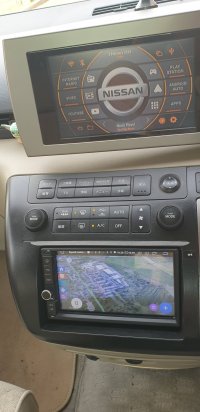
Top screen is x96mini with Amaga Launcher running
 
Not on the x96mini, so I bought a 2.4ghz air mouse remote
 
Can the x96 run Google maps?
 
Funny, you ask that because that's my project at the moment. It doesn't have gps built in and I ve not had much success in the past of finding a gps dongle that works with android, however, I found one that does work on amazon and I started testing it yesterday.... you need to install an app called gps connector and set that as the mock location in android for for gps apps to see the signal... still playing but will update you.

The HU reloaded app works, which basically gives you android auto or carplay via a USB connection. Works well, but unfortunately the x ninety six mini only has 2 amp usb ports, not enough charge for my s twenty four ultra, so the battery depletes on the phone over about two or three hours. This app does also have a wifi connection, but somehow I ve never been able to make that work... i'm sure I can get it working, just having invested the time.
 
That's interesting. I've been attempting on and off to run google maps on a mini PC running an Android emulator but the emulator doesn't pick up the GPS from the PC. I'll find the gps connector app and give that a go.

There are a few Windows map apps which run ok on the PC but they are not easily useable as they aren't set up for small screen resolution.
 
This thread is amazing beyond my comprehension.

I struggle to tilt the front screen and my screen in the roof has never worked other than to let the passengers know they are in a Nissan.
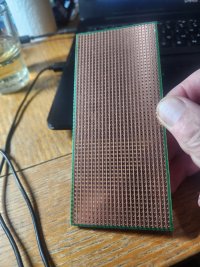
 
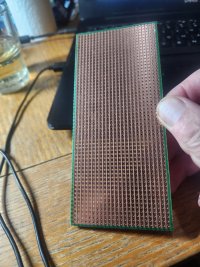
Did a quick test on my desktop PC with the Mumu Android emulator using the GPS Connector app and it works in simulation mode with Google maps, so that's a good sign. Will check it out on the mini PC in the Elgrand tomorrow which is fitted with a GPS receiver, unlike my desktop PC.
 
This thread is amazing beyond my comprehension.

I struggle to tilt the front screen and my screen in the roof has never worked other than to let the passengers know they are in a Nissan.
This as far as I've got lol 20251027_192536.jpg
 

Attachments

  • 20251027_192536.jpg
    20251027_192536.jpg
    577.1 KB · Views: 2
I’ve been running an X96 Mini Android TV box in my Elgrand E51 for about three years now, using an HDMI converter. It’s been solid at 480p, and honestly, the picture quality is surprisingly good considering the screen is over twenty years old.

The only issue I’ve ever had is the occasional bit of signal noise caused by the vehicle’s electrical system. I managed to eliminate most of that with a ground loop isolator on both the audio and video lines. In fact, I recently cut the noise down almost completely by connecting the X96 Mini’s AV output directly to the van’s RCA ports, bypassing the converter altogether.

As for using Samsung DeX — I can’t really see the point. The screen image would be tiny, and it’s much more practical to just mount your phone on the dash and use its own, far better display.
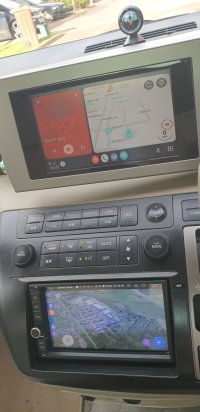
I've used a Samsung DeX - mixed results
 
Back
Top