Awesome thanks!

-
Welcome to the ElgrandOC forum. You will find that the majority of the forum is locked, but do not worry. You can unlock more content by registering to the forum completely free. Sign up is automatic, does not require email confirmation and is instant. Feel free to browse through the sections to see what topics have been covered before you register. You can register for an account by CLICKING HERE Once you have registered, you will unlock more of the forum content. You will not unlock all of the content until you have reached 10 posts. This is to give you an opportunity to chat to existing members and help to integrate you into the forum community. We are a friendly and helpful community and there is a wealth of infomation contained within the forum. Please feel free to register, introduce yourself and get to know your fellow members. Feel free to look at the Frequently Asked Questions section, the Meets/Events section and the Competition Section without having to register. We look forward to getting to know you and help you with any questions or problemd you have with your Elgrand.
You are using an out of date browser. It may not display this or other websites correctly.
You should upgrade or use an alternative browser.
You should upgrade or use an alternative browser.
Rear Screen not lowering!
- Thread starter Adam Cusack
- Start date

- Messages
- 66
- Reaction score
- 120
- Points
- 43
- Location
- Suriname - South America
- First Name
- Arvin
- Elgrand
- E51
- Region
- Rest Of World
Hello, mine stopped working after 1.5 yrs of owning the vehicle. What I notice is some very faint clicking noise (at 1 sec intervals) at the monitor (even with ignition switch off). Also when ign switch first turn on, it defaults to last used source, if it was radio or video, which is normal. However if it's on radio and I press TV, the main screen shows the aux input (TV or in my case video feed from my android box) and 2nd screen button does nothing. At this point my clock also freezes. I can't go back to radio either, it stays on aux. The only way to go back to radio is to put a cd or dvd in the nav unit in the glove box, at which point it switches to the nav display (or tries to). If I now select my FM radio it works. But now I cannot go back to TV, I have to turn ign switch off and on to go back to TV. It's like the main control unit gets corrupted for some reason and I guess it's the NAV unit since that controls everything.


- Messages
- 271
- Reaction score
- 659
- Points
- 223
- Location
- Hull
- First Name
- Dean
- Elgrand
- E51
- Region
- Yorkshire
I wouldn't mind an answer to this too. Nothing from my rear screen. I did put a meter on the power plug but it showed nothing. I guess the issue is bigger than first thought. Someone mentioned a module which may have been damaged but really not sure where that is or if it's easy to replace.
Wasn't sure on fuses neither so took every fuse out one by one. All seem ok...
Wasn't sure on fuses neither so took every fuse out one by one. All seem ok...
- Messages
- 10
- Reaction score
- 36
- Points
- 73
- Location
- Dorchester
- First Name
- Neil
- Elgrand
- E51
- Region
- South West
I have this exact same problem - no beep from buttons (dash or remote), other buttons do beep - threat overhead screen will not fold down.. did anyone manage to resolve?

- Messages
- 723
- Reaction score
- 1,606
- Points
- 313
- Location
- edinburgh
- First Name
- james
- Elgrand
- E51
- Region
- Scotland
Just stating the obvious.
So on mine you press the button (a long press something like 5 seconds) you get a bleep then the screen lowers ( I'm still holding the button down, I do not lift) so in total 1 long press, something like 8 to 10 seconds.
So on mine you press the button (a long press something like 5 seconds) you get a bleep then the screen lowers ( I'm still holding the button down, I do not lift) so in total 1 long press, something like 8 to 10 seconds.

- Messages
- 13,379
- Reaction score
- 40,428
- Points
- 473
- Location
- Normandie
- First Name
- André
- Elgrand
- E51
- Region
- Rest Of World
Here's my theory having just replaced the DVD/Nav unit in my series 1. I had been having a few issues with the system including a sporadic unlocked picture, random operation of inputs and intermittently the rear screen would not drop. I purchased a late model series 2 unit as a replacement and having fitted it my problems have gone away. The units are identical on the outside and are plug and play.
I decided to dismantle the old unit for fault investigation and noted that the cooling fan was inoperative. Now, there are many surface mount capacitors within the unit which take objection to being too hot and they dry out. This greatly reduces their efficiency, and being that the unit is the nerve centre of the AV system I would suspect that this may have been the cause of the problems, including the rear screen not dropping.
So if you have this issue you could look to see if the cooling fan is working as a starter. Quite tricky in a series 1 as you need to remove the trim by the drivers foot rest and try to see it from there, you'll probably need to use the camera on your phone and a torch.
One bonus for owners of series 1 Elgrands is you can carry out the series 2 clock mod and have the correct local time displayed.
Good luck.
I decided to dismantle the old unit for fault investigation and noted that the cooling fan was inoperative. Now, there are many surface mount capacitors within the unit which take objection to being too hot and they dry out. This greatly reduces their efficiency, and being that the unit is the nerve centre of the AV system I would suspect that this may have been the cause of the problems, including the rear screen not dropping.
So if you have this issue you could look to see if the cooling fan is working as a starter. Quite tricky in a series 1 as you need to remove the trim by the drivers foot rest and try to see it from there, you'll probably need to use the camera on your phone and a torch.
One bonus for owners of series 1 Elgrands is you can carry out the series 2 clock mod and have the correct local time displayed.
Good luck.
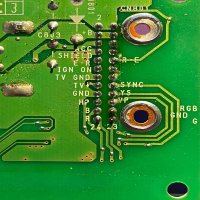
Sorry to resurrect this thread. I am trying to replace my old tv with a new xtrons unit and I’d love a plug in adapter to connect the power and the feed from the factory dvd and front screen - also the rear aux so the new xtrons would work as the old tv did - can you send me a better version of this image as google translate can’t read it all
 - thanks.
- Messages
- 723
- Reaction score
- 1,606
- Points
- 313
- Location
- edinburgh
- First Name
- james
- Elgrand
- E51
- Region
- Scotland
All I did was, a new power feed from xtrons along roof, down a Piller down behind heater and at the end, I put a cigarette lighter plug, to plug in when ever I want to use and unplugged when not in use, so no power drain
What did you do for video feeds?All I did was, a new power feed from xtrons along roof, down a Piller down behind heater and at the end, I put a cigarette lighter plug, to plug in when ever I want to use and unplugged when not in use, so no power drain
- Messages
- 723
- Reaction score
- 1,606
- Points
- 313
- Location
- edinburgh
- First Name
- james
- Elgrand
- E51
- Region
- Scotland
Did same to all, extended hdmi put a 2 way switch on so could watch free view ( no internet required).or switch over to fire stick.
Why mess with wires you don't need too.
Why mess with wires you don't need too.
So did you loose the ability to show the front dvd player on the rear screen? My kids live watching the old Disney films and it doesn’t rely on internet then. Also the sound quality is superior to the fm transmitted output of the xtrons.Did same to all, extended hdmi put a 2 way switch on so could watch free view ( no internet required).or switch over to fire stick.
Why mess with wires you don't need too.
- Messages
- 723
- Reaction score
- 1,606
- Points
- 313
- Location
- edinburgh
- First Name
- james
- Elgrand
- E51
- Region
- Scotland
Sorry buddy, I'm no good with electric stuff, just wanted to keep everything separate, yes you could plug the yellow red white in back of stereo, but you need to the ignition on, ok if driving, but I got leisure battery, to watch what I want, without key in and power on.
You set it up, to suit yourself.
You set it up, to suit yourself.
- Messages
- 13,379
- Reaction score
- 40,428
- Points
- 473
- Location
- Normandie
- First Name
- André
- Elgrand
- E51
- Region
- Rest Of World
Sorry to resurrect this thread. I am trying to replace my old tv with a new xtrons unit and I’d love a plug in adapter to connect the power and the feed from the factory dvd and front screen - also the rear aux so the new xtrons would work as the old tv did - can you send me a better version of this image as google translate can’t read it all
Attachments

- Messages
- 69
- Reaction score
- 142
- Points
- 153
- Location
- NL
- First Name
- Will
- Elgrand
- Looking to buy
- Region
- Rest Of World
Here's my theory having just replaced the DVD/Nav unit in my series 1. I had been having a few issues with the system including a sporadic unlocked picture, random operation of inputs and intermittently the rear screen would not drop. I purchased a late model series 2 unit as a replacement and having fitted it my problems have gone away. The units are identical on the outside and are plug and play.
I decided to dismantle the old unit for fault investigation and noted that the cooling fan was inoperative. Now, there are many surface mount capacitors within the unit which take objection to being too hot and they dry out. This greatly reduces their efficiency, and being that the unit is the nerve centre of the AV system I would suspect that this may have been the cause of the problems, including the rear screen not dropping.
So if you have this issue you could look to see if the cooling fan is working as a starter. Quite tricky in a series 1 as you need to remove the trim by the drivers foot rest and try to see it from there, you'll probably need to use the camera on your phone and a torch.
One bonus for owners of series 1 Elgrands is you can carry out the series 2 clock mod and have the correct local time displayed.
Good luck.
Just making sure I understand this correctly. So the DVD/Nav unit (the one i can see when I open the flap in the center console) is an essential part for the rear screen to work?
Having the same 'screen won't come down' and the tv button doesn't do anything. Nor does the buttons on the remote make a sound (except for the volume up/down thingy).
- Messages
- 13,379
- Reaction score
- 40,428
- Points
- 473
- Location
- Normandie
- First Name
- André
- Elgrand
- E51
- Region
- Rest Of World
Yes, the Nav drive is control central for the system. If you are having numerous issues it might be worth doing the old battery disconnection trick to reboot the entire system.Just making sure I understand this correctly. So the DVD/Nav unit (the one i can see when I open the flap in the center console) is an essential part for the rear screen to work?
Having the same 'screen won't come down' and the tv button doesn't do anything. Nor does the buttons on the remote make a sound (except for the volume up/down thingy).
- Messages
- 696
- Reaction score
- 1,949
- Points
- 213
- Location
- North Lincolnshire
- First Name
- Brian
- Elgrand
- E51
Did anyone ever get a definitive answer for the rear screen problems? put mine on first time (apart from playing) for my grandson while out, ran perfectly for 25 minutes then the rear screen went blank but sound continued, the screen is now stuck down, DVDs still play ok on the front screen and the volume works ok on remote. Is there any way to put the screen back up, or can anyone tell me what parts I may need. I feel Lestempy may be correct with the fan and capacitor issue as the disc was warm when I removed it and I have had this before on circuits where the capacitors bulge/dome as they get older and too hot. I have disconnected the battery over night for a reset but it made no difference. Series 3 model.
- Messages
- 5
- Reaction score
- 28
- Points
- 13
- Location
- Leominster
- First Name
- Ricky
- Elgrand
- E51
- Region
- Midlands
same problem can hear a continuous clicking but no screen drops down no beep ?It seems my screen will not go down either, interestingly I can here a clicking sound from the unit when it is plugged in, I think it might be a bad power supply circuit on the board. I have removed the unit for inspection. Does anyone have a wiring schematic for this unit showing how it connects to the vehicle? I would be very grateful for a copy if possible.

- Messages
- 5
- Reaction score
- 28
- Points
- 13
- Location
- Leominster
- First Name
- Ricky
- Elgrand
- E51
- Region
- Midlands
it did come down and go back up when i first got it but had suddenly decided to stay upsame problem can hear a continuous clicking but no screen drops down no beep ?
- Messages
- 17
- Reaction score
- 27
- Points
- 13
- Location
- Manchester UK
- First Name
- Colin
- Elgrand
- E51
- Region
- North West
We have just got our e51 s3. The seller told us the rear screen didn't drop down or work but no reasons why. Looking through information there should be RCA connectors behind the flap below the drivers seat which I can't find. There are also some odd cables with connectors in the glove box, one with a small fakra connector and the other looks like s small 2 pin connector. No idea what they are for yet. Checked the AC remote works but getting nothing from the multimedia remote.