• Welcome to the ElgrandOC forum.

    You will find that the majority of the forum is locked, but do not worry. You can unlock more content by registering to the forum completely free. Sign up is automatic, does not require email confirmation and is instant. Feel free to browse through the sections to see what topics have been covered before you register.
    You can register for an account by CLICKING HERE

    Once you have registered, you will unlock more of the forum content. You will not unlock all of the content until you have reached 10 posts. This is to give you an opportunity to chat to existing members and help to integrate you into the forum community.
    We are a friendly and helpful community and there is a wealth of infomation contained within the forum. Please feel free to register, introduce yourself and get to know your fellow members.

    Feel free to look at the Frequently Asked Questions section, the Meets/Events section and the Competition Section without having to register.
    We look forward to getting to know you and help you with any questions or problemd you have with your Elgrand.

No Aux - E51 Series 3 - CY-TN0700AJ TV tuner

aciaman

Active Newbie
Premium Member
E51 Owner
North East
Messages
25
Reaction score
44
Points
63
Location
Newcastle upon Tyne
First Name
James
Elgrand
E51
Region
North East
Is there a process to activate the Auxiliary ports at the back? I'm trying to get some sort of media stick working, tried a Roku and Firestick. I have an HDMI to AV converter (defo HDMI to AV, not the other way around), it is set to NTSC but I have nothing on screen. Using a Japanese to UK converter off the 100W socket to power both the converter and Roku stick, but I have independently powered each of the 12v connections in case it's a power issue.

Ours is fitted with a CY-TN0700AJ TV tuner which has its own remote. Followed all instructions.

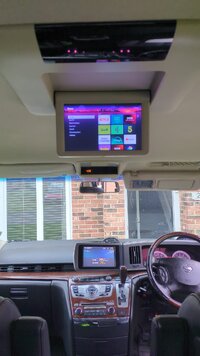
As far as I can see we have factory everything, front and rear screens. Screens work for everything else, I can watch DVD's fine.

I'm at my wits end.
 
Do you have three remotes? If so, select aux on front, rear using big remote and also small remote.

If you have a device like a game machine or dvd that has Red yellow white RCA output, connect this to the sockets so you eliminate all the other stuff you are trying to connect from the enquiry. You need to get to a point where the sockets work, don't worry about picture quality just get something displaying to prove it works.

You can pull top of rear offside internal panel off and make sure the cable from three sockets is actually connected to something. Previous owner may have disconnected.

Also, what do you see on screens, nothing, fuzz, error code?
 
Do you have three remotes? If so, select aux on front, rear using big remote and also small remote.

If you have a device like a game machine or dvd that has Red yellow white RCA output, connect this to the sockets so you eliminate all the other stuff you are trying to connect from the enquiry. You need to get to a point where the sockets work, don't worry about picture quality just get something displaying to prove it works.

You can pull top of rear offside internal panel off and make sure the cable from three sockets is actually connected to something. Previous owner may have disconnected.

Also, what do you see on screens, nothing, fuzz, error code?
I have the the two stock remotes on the rear of the front seats, and another which is for the tuner. I have pressed Aux on both the front, rear and small remote, all I get is a blank screen.

Aside the Roku and firesticks I have, the only other device I have is a DVD player with RCA ports. I have also connected this via the HDMI to RCA converter.

I have had the rear panel off, nothing appears to be disconnected. There are no error codes, just a blank screen with Aux in the top left corner which disappears shortly after selected Aux.

LeStempy's guide posted above, is exactly the setup I have in terms of dash layout and third remote.

By the way, the smaller third remote responds to me pressing the Aux button and volumes buttons and I have replaced the battery.
 
My car and third remote is exactly as you have in this guide, the only difference is that I do not get the error code, just a blank screen.

Any thoughts? I'm wondering if the RCA module is faulty, I have a replacement coming just in case.

Also, my Tuner seems to power the 360 cameras, so removing it doesn't seem to be an option.d38fcd1c-9205-45a3-95e5-f1aa654b9263.jpeg
 
Both tuners need to be set to aux. Best bet is to remove digital tuner in the back and link out as in the guide. Not heard of anyone losing the cameras in the process. Give it a go, you can always put it back to standard.
 
Both tuners need to be set to aux. Best bet is to remove digital tuner in the back and link out as in the guide. Not heard of anyone losing the cameras in the process. Give it a go, you can always put it back to standard.
Interesting, hadn't seen the guide lower down.

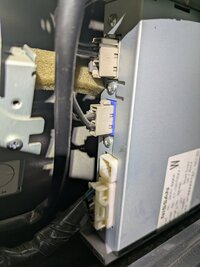
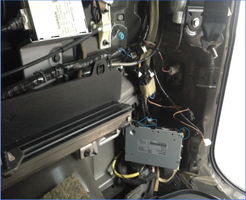
So what I thought was my TV tuner (which does disconnect the TV when I remove the cable, visible top left of attached image), maybe isn't? Your pic attached has the same unit as mine (top of image attached), but are you saying there is another tuner in the side panel further down at the back, as you have marked in blue?Screenshot 2026-05-06 at 20.34.14.png
 
Series 3 came with two TV tuners, analogue behind the side panel and digital in the rear. Both are useless outside of Japan. The aux input loops through both tuners, the RCA module plugs into the analogue tuner and the signal routed via the aux input of both tuners. Bridging the digital tuner in the rear is a simple job as it doesn't upset the rest of the system and removes one useless piece of equipment from the signal path.
 
Also, check the routing of the cable from the aux input sockets. Sometimes these are rerouted by people wanting to use them for aftermarket systems which are often removed before sale.
 
Brilliant, thank you. Looks like I have more panels to remove and some further investigating to do. If that second (rearmost) tuner is missing, I suppose it is then a case of bridging the cables as per your instructions?

Looks like I have found the analogue tuner, not the digital, if it is even still present.
 
These vehicles often come pre-tinkered.
 
These vehicles often come pre-tinkered.
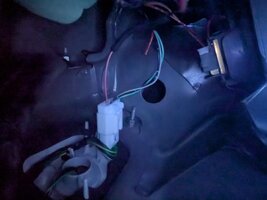
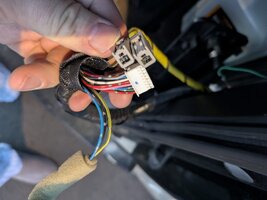
WhatsApp Image 2026-05-06 at 21.14.22.jpegWhatsApp Image 2026-05-06 at 21.14.22 (1).jpegWhatsApp Image 2026-05-06 at 21.14.22 (2).jpegWhatsApp Image 2026-05-06 at 21.14.23.jpeg

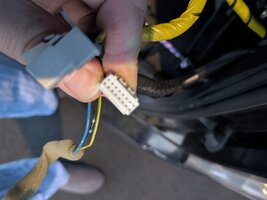
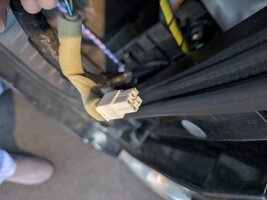
Just nipped outside, couldn't resist a peek. Popped off the panel in the rear where the 12v connection is, no sign of a TV tuner in there, but put my hand in and pulled out the following, see pics. Are those the digital TV tuner connections?

Looks like two aerials (grey cables), 16 pin communications cable and a 4 pin power supply cable.
 
Last edited:
So will your instructions on bridging the pins do the trick and get the RCA ports near the 100W connection working? If so, do I then just select Aux to receive the input from there?

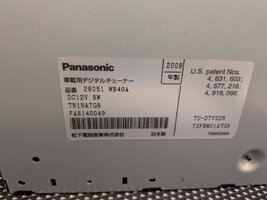
Oh, and do you know what Digital TV tuner was removed? Model number etc?
 
The instructions aren't actually mine I just posted the link to them from my list of useful information, but yes, if you bridge the pins you should find the aux input of the other analogue tuner will show on the screens. Bear in mind that the front screen video will mute when the park brake is released unless it has been modified.

This is a rotated and enlarged picture of the tuner from the instruction sheet.

b62bcf43-9987-41ad-bdb5-7679dc8ad7f0.jpg
 
Brilliant, thank you. I know what I'm doing tomorrow night after work. I will let you know how it goes.
 
This is a pic of the tuner I removed from my S3.

1000018688.jpg
 
Back
Top